
A single Swift file you can drop into a macOS app target. Handles the headless install/uninstall flow, install and running detection, and posts the show/hide notifications.
Drop KeylumeIntegration.swift into your target, then show a temporary keyboard layer:
import SwiftUI

struct ContentView: View {
    @State private var showing = false

    var body: some View {
        Button(showing ? "Hide keyboard" : "Show keyboard") {
            if showing {
                KeylumeIntegration.shared.hideKeyboard()
            } else {
                KeylumeIntegration.shared.showKeyboard(bindings: [
                    "q": .app(bundleID: "com.apple.Safari"),
                    "w": .app(bundleID: "com.apple.mail"),
                    "f": .symbolText(symbol: "magnifyingglass", text: "Find"),
                    "s": .symbolText(symbol: "square.and.arrow.down", text: "Save"),
                ])
            }
            showing.toggle()
        }
    }
}

// Drop a pre-built install/uninstall + fill-mode pane into Settings:
struct SettingsView: View {
    var body: some View { KeylumeSettingsForm() }
}
The KeylumeIntegration.installHeadless() call downloads Keylume.app, configures it for a silent, no-menu-bar setup, and launches it in the background. The user never sees Keylume's own UI.
Keylume.app to /ApplicationsDistributedNotificationCenter notificationsUserDefaults on the com.lowtechguys.Keylume suiteKeylume exposes three equivalent interfaces. The CLI and URL scheme are thin wrappers around the same distributed notifications, so they can do the same operations.
keylume). Easiest entry point for shell scripts.keylume://...). Handy from open, AppleScript, Shortcuts, or browsers.com.lowtechguys.Keylume.*. For in-process control from another Swift or Objective-C app.All actions are reachable from every interface. The notification name is the column on the left, prefixed by com.lowtechguys.Keylume.; the URL path is keylume://<verb>.
| Notification | URL verb | Purpose |
|---|---|---|
show | show | Show the keyboard, optionally with a temporary layer |
hide | hide | Hide the keyboard |
toggle | toggle | Toggle visibility, optionally with a temporary layer |
reset | reset | Clear the active temporary layer without hiding |
store | store | Persist a custom layer without showing the keyboard |
edit | edit | Update individual keys on a stored layer |
remove | remove | Delete a stored layer |
Layers can also be moved to and from JSON files via the URL scheme (keylume://export, keylume://import) or the CLI (keylume layers export, keylume layers import).
The show, toggle, store, edit, and remove actions accept the same key/value mapping. Bindings override key labels while the keyboard is visible; the temporary layer clears when the keyboard hides or when reset is called.
Lowercase QWERTY labels: a..z, 0..9, esc, tab, backspace, return, f1..f12, up, down, left, right, and URL-encoded punctuation keys (-, =, [, ], ;, ', ,, ., /, \).
| Format | Example | Result |
|---|---|---|
| plaintext | Save | Text label |
s:name | s:arrowtriangle.up | SF Symbol |
a:bundleID | a:com.apple.Safari | App icon |
symtext:name|text | symtext:magnifyingglass|Find | SF Symbol with a caption below it |
| Key | Value | Effect |
|---|---|---|
fill | visible, dim, blank | How keys without a binding look: normal, faintly dimmed, or hidden |
blank | 1 | Hide keys without a binding (legacy alias for fill=blank) |
dimBlankModifierKeys | 1 or 0 | Also apply fill=dim or fill=blank to non-bindable keys (shift, ctrl, option, cmd, fn). Overrides the user's setting for this layer. |
x:y | X:Y | Exact screen coordinates (takes priority over position) |
width | pixels | Set keyboard width (minimum: 500) |
position | named position | bottom, top, left, right, center, topLeft, topRight, bottomLeft, bottomRight |
offset | X:Y or single value | Offset or padding for the computed position |
screen | ID or name | CGDirectDisplayID (number) or a fuzzy name (e.g. dell, built-in). Defaults to the screen with the cursor. |
hideAfterMS | milliseconds | Auto-hide the keyboard after this delay |
fadeOutMS | milliseconds | Fade-out duration before hiding (default: 500) |
theme | name | Apply a saved theme by name (fuzzy match) while the keyboard is shown; reverts when it hides |
persist | 1 | Save the layer as a permanent custom layer (requires modifiers or app) |
modifiers | dash-separated | Modifier combo that activates the persisted layer (e.g. rcmd-rshift). Possible values: fn, lshift, rshift, lctrl, rctrl, lopt, ropt, lcmd, rcmd, hyper |
name | text | Display name for the persisted layer (defaults to modifiers string) |
app | bundle ID | Scope the layer to one app. Pair with modifiers, or omit modifiers for the app's base (no-modifier) layer. |
holdDelay | seconds | Per-app hold-to-summon delay. Requires app. Stored alongside the app's layers. |
Keylume ships with a keylume CLI. Install it from the menu bar menu, which symlinks it to ~/.local/bin/keylume. Run keylume --help or keylume <command> --help for the full option list.
keylume show
keylume hide
keylume toggle
keylume layers reset       # clear any active temporary layer
Pass key bindings to show or toggle to override key labels while the keyboard is visible. The overlay clears when the keyboard hides or on keylume layers reset.
# Bind keys to app icons / symbols / labels
keylume show --app q=Safari --app w=Chrome --symbol e=pencil --text m=Mail --blank

# Symbol-with-caption per key (a shortcut cheatsheet)
keylume show --symtext f="magnifyingglass|Find" --symtext s="square.and.arrow.down|Save" --dim

# Positioning, width, auto-hide, themed display
keylume show --position bottom --width 800 --hide-after-ms 3000
keylume show --theme "Muted"
--theme NAME applies a saved theme (fuzzy-matched) while visible and reverts on hide.
keylume layers manages persisted custom layers. A layer can be global (triggered by a modifier combo system-wide) or scoped to one app (only active when that app is frontmost).
# List
keylume layers list                          # one-line summary per layer
keylume layers list "App Switcher"           # full key dump for one layer
keylume layers list --modifiers rcmd
keylume layers list --for-app Pixelmator
keylume layers list --json                   # raw export schema

# Store
keylume layers store --modifiers ralt --name "Browsers" \
    --app s=Safari --app c=Chrome --app f=Firefox

# Edit (creates the layer if it doesn't exist)
keylume layers edit --modifiers rcmd --app e=Notes
keylume layers edit --modifiers rcmd --unset-key e

# Remove
keylume layers remove --modifiers rcmd
Add --for-app APP to scope a layer to one app. Without --modifiers it becomes the app's base layer, summoned by long-pressing the fn key while the app is frontmost.
# Modifier-triggered layer that only shows inside Pixelmator
keylume layers store --modifiers cmd --for-app Pixelmator --name "Pixelmator" \
    --symtext c="doc.on.doc|Copy"

# Base layer (no modifier), summoned by long-pressing `fn` inside the app
keylume layers store --for-app Pixelmator \
    --symtext b="paintbrush|Brush" --symtext e="eraser|Erase"

# Per-app hold-to-summon delay (seconds)
keylume layers store --modifiers cmd --for-app Pixelmator --hold-delay 1.5 \
    --symtext c="doc.on.doc|Copy"
keylume themes list                          # active theme marked with *
keylume themes export                        # all themes to stdout
keylume themes export --name "Nord" -f nord.json
keylume themes import themes.json            # duplicates renamed (e.g. "Nord 2")
keylume layers export                        # all layers to stdout
keylume layers export --modifiers rcmd -f layer.json
keylume layers import layers.json            # merges into matching layers
keylume layers import layers.json --replace  # overwrites matching layers
Layers with new modifier combos are added either way. Importing without --replace merges bindings into existing layers with the same modifier combo (conflicts use the imported value); with --replace, the existing layer is overwritten entirely.
For values that don't fit --app / --symbol / --text / --symtext, use -k KEY=VALUE with the same value syntax as the URL scheme:
keylume layers store --modifiers rcmd \
    -k q=app:Safari -k e=symbol:pencil -k m=text:Mail -k f="symtext:magnifyingglass|Find"
Extended prefixes: app:Name, symbol:name, text:value, symtext:symbol|text.
--app KEY=APP
APP is an app name (Safari), a path (/Applications/Google Chrome.app), or a bundle ID (com.apple.Safari).--for-app APP
store, edit, remove, and (paired with --persist) show or toggle.--modifiers, creates the app's base layer (no modifier held, summoned by long-pressing the fn key).--hold-delay SECONDS
--for-app.--blank / --dim
--blank hides them. --dim keeps them faintly visible as a reference.--dim-blank-modifier-keys / --no-dim-blank-modifier-keys
-k KEY=VALUE
Every URL action is invoked the same way:
open -g "keylume://<verb>?<params>"
The -g flag keeps the calling app focused. Parameters are URL-encoded query string keys. The supported verbs are listed in the Action reference; parameters are listed in the Parameter reference.
# Minimal show / hide / toggle
open -g keylume://show
open -g keylume://hide
open -g keylume://toggle
open -g keylume://reset

# show with a temporary navigation layer
open -g "keylume://show?y=s:arrow.left.to.line&u=s:arrow.up&h=s:arrow.left&j=s:arrow.down&k=s:arrow.right&i=s:arrow.right.to.line&blank=1"

# Persist an rcmd app switcher
open -g "keylume://store?q=a:com.apple.Safari&w=a:com.apple.mail&modifiers=rcmd&name=App%20Switcher"

# Update or remove one key
open -g "keylume://edit?modifiers=rcmd&e=a:com.apple.Notes"
open -g "keylume://edit?modifiers=rcmd&q=-"

# Remove a layer
open -g "keylume://remove?modifiers=rcmd"

# Export / import layers
open -g "keylume://export?file=/tmp/layers.json"
open -g "keylume://export?file=/tmp/layers.json&modifiers=rcmd"
open -g "keylume://import?file=/tmp/layers.json"
open -g "keylume://import?file=/tmp/layers.json&replace=1"
Set a key's value to - (as in the edit example above) to remove that binding.
Post to DistributedNotificationCenter.default(). The notification name is com.lowtechguys.Keylume.<action>; parameters go in userInfo as a [String: String] dictionary using the same keys and values as the URL scheme.
DistributedNotificationCenter.default().post(
    name: .init("com.lowtechguys.Keylume.show"),
    object: nil,
    userInfo: [
        "y": "s:arrow.left.to.line",
        "u": "s:arrow.up",
        "h": "s:arrow.left",
        "j": "s:arrow.down",
        "k": "s:arrow.right",
        "i": "s:arrow.right.to.line",
        "blank": "1",
    ]
)
Notification.Name extensionA convenience extension covering every action:
extension Notification.Name {
    static let keylumeShow    = Notification.Name("com.lowtechguys.Keylume.show")
    static let keylumeHide    = Notification.Name("com.lowtechguys.Keylume.hide")
    static let keylumeToggle  = Notification.Name("com.lowtechguys.Keylume.toggle")
    static let keylumeReset   = Notification.Name("com.lowtechguys.Keylume.reset")
    static let keylumeStore   = Notification.Name("com.lowtechguys.Keylume.store")
    static let keylumeRemove  = Notification.Name("com.lowtechguys.Keylume.remove")
    static let keylumeEdit    = Notification.Name("com.lowtechguys.Keylume.edit")
}
A throwaway overlay that relabels six keys as vim-style arrows. The bindings clear when the keyboard hides.
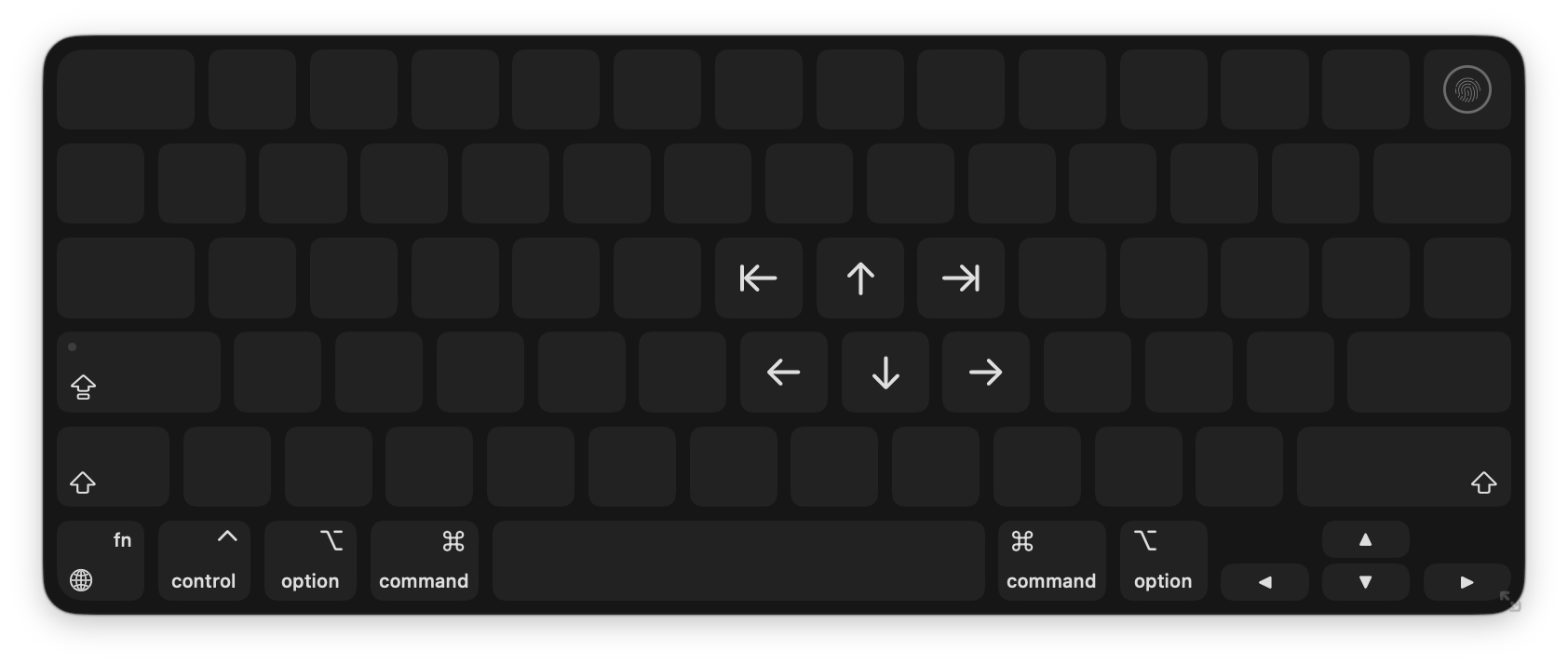
keylume show --blank \
    --symbol y=arrow.left.to.line \
    --symbol u=arrow.up \
    --symbol h=arrow.left \
    --symbol j=arrow.down \
    --symbol k=arrow.right \
    --symbol i=arrow.right.to.line
Equivalent URL:
open -g "keylume://show?y=s:arrow.left.to.line&u=s:arrow.up&h=s:arrow.left&j=s:arrow.down&k=s:arrow.right&i=s:arrow.right.to.line&blank=1"
A permanent layer triggered by holding right-cmd. Keys show app icons; pressing one switches to that app.
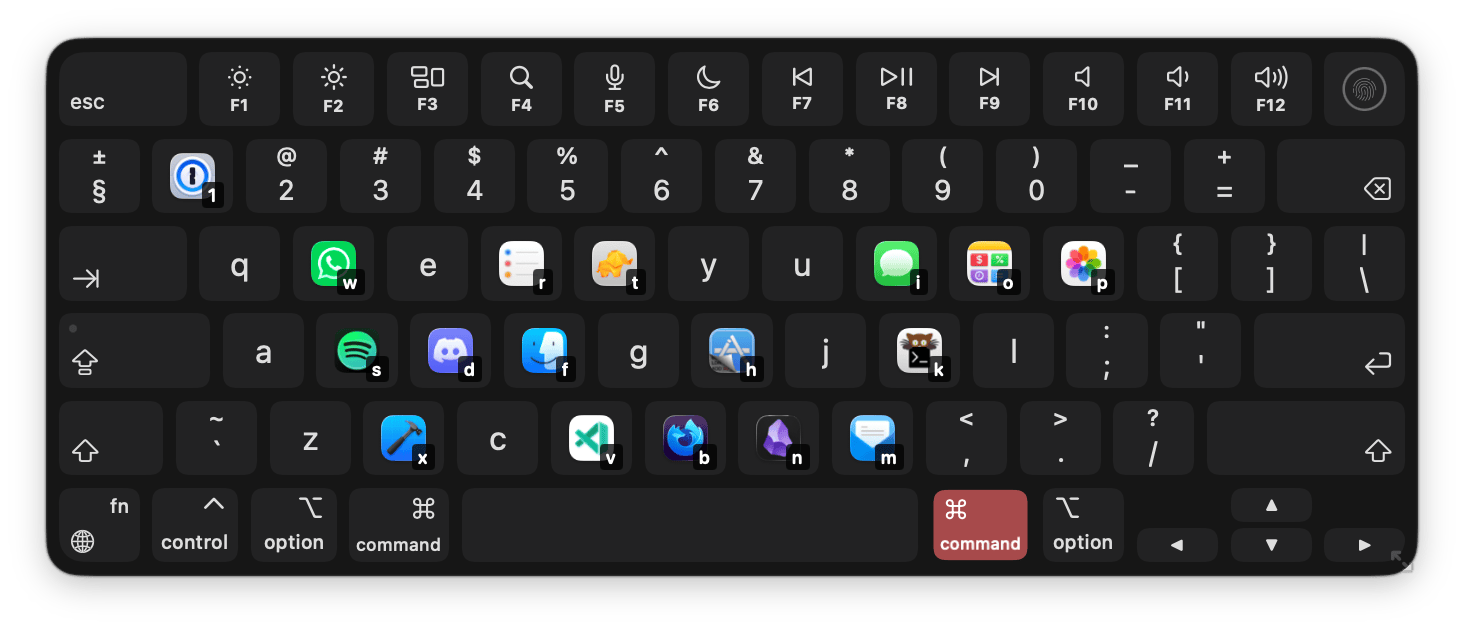
keylume layers store --modifiers rcmd --name "App Switcher" \
    --app q=Safari --app w=Mail --app e=Notes
Equivalent URL:
open -g "keylume://store?modifiers=rcmd&name=App%20Switcher&q=a:com.apple.Safari&w=a:com.apple.mail&e=a:com.apple.Notes"
A layer that only shows while Pixelmator is frontmost, triggered by holding cmd:
keylume layers store --modifiers cmd --for-app Pixelmator --name "Pixelmator" \
    --symtext c="doc.on.doc|Copy" --symtext v="doc.on.clipboard|Paste"
Layer exports are a JSON array. Each layer carries the same key value syntax as the URL scheme.
[
  {
    "name": "App Switcher",
    "modifiers": "rcmd",
    "enabled": true,
    "keys": {
      "q": "a:com.apple.Safari",
      "w": "s:pencil",
      "e": "Mail"
    }
  }
]
On import, layers with new modifier combos are always added. Layers with a matching modifier combo are merged by default (conflicts use the imported value); pass replace=1 (URL / notification) or --replace (CLI) to overwrite the existing layer entirely.